
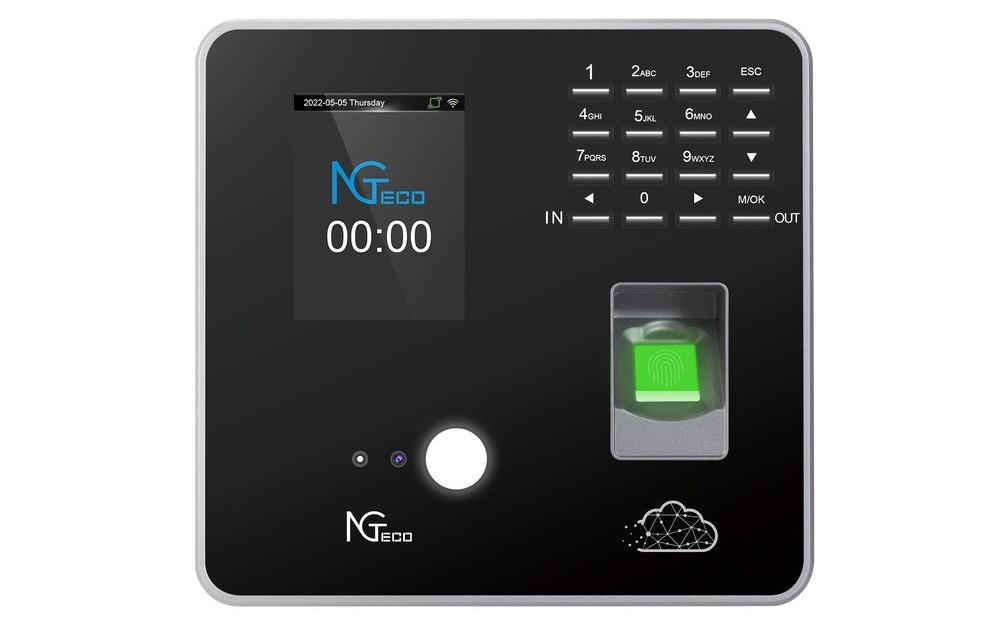
In today’s fast-paced business environment, managing employee attendance and ensuring data security are critical challenges. Small to medium-sized business owners often struggle with traditional attendance systems that are costly, inefficient, and lack robust security features. Manual time tracking opens doors to buddy punching, timesheet fraud, and administrative errors that drain resources and compromise payroll accuracy. Meanwhile, storing sensitive employee data on local servers exposes businesses to devastating risks from hardware failures, cyberattacks, and compliance violations.
This article explores how a biometric fingerprint time attendance system, coupled with GPS punch-in and cloud-based data protection, can revolutionize your business operations. We will discuss the key benefits, implementation steps, and how to choose the right solution to secure your business. By understanding these modern workforce management tools, you’ll discover practical ways to eliminate time theft, automate payroll processes, and protect your company’s most valuable information while creating a more accountable workplace culture that benefits both employers and employees.
Understanding Biometric Fingerprint Time Attendance Systems
Biometric fingerprint time attendance systems represent a significant leap forward from traditional punch cards and manual timesheets. These systems use unique biological characteristics—specifically fingerprint patterns—to verify employee identity during clock-in and clock-out processes. Unlike passwords or ID cards that can be shared or forgotten, fingerprints are inherently personal and cannot be transferred between employees, making them an ideal authentication method for workforce management.
The technology works by capturing and storing a mathematical representation of an employee’s fingerprint during initial enrollment. When an employee attempts to clock in, the system scans their finger, converts the pattern into data, and matches it against stored templates in milliseconds. This process happens automatically without requiring manual data entry or supervisor verification. Modern systems integrate directly with payroll software, eliminating the need for HR staff to manually calculate hours worked, overtime, or late arrivals.
Key features that make these systems valuable include automatic time clock functionality that records precise timestamps for each attendance event, easy-to-use biometric fingerprint scanners designed for high-traffic environments, and seamless integration capabilities with existing payroll and HR management software. Many systems also offer real-time monitoring dashboards that allow managers to view attendance patterns, identify trends, and address issues as they occur rather than discovering problems weeks later during payroll processing. The combination of biometric authentication with cloud connectivity creates a powerful tool for businesses seeking to modernize their workforce management while maintaining strict security standards.
Benefits of Biometric Fingerprint Systems
The security advantages of biometric fingerprint systems far exceed traditional attendance methods. Each fingerprint contains unique ridge patterns and minutiae points that are virtually impossible to replicate, making buddy punching—where one employee clocks in for another—essentially impossible. This eliminates one of the most common forms of time theft that costs businesses thousands of dollars annually. The biometric data itself is encrypted and stored as a mathematical template rather than an actual fingerprint image, addressing privacy concerns while maintaining security integrity.
Accuracy improvements stem from removing human involvement in the time-tracking process. Automated time clock functionality captures exact timestamps without rounding errors or manual transcription mistakes. Employees cannot accidentally enter incorrect times, and managers don’t need to decipher illegible handwriting on paper timesheets. This precision extends to calculating overtime, break periods, and shift differentials, ensuring employees are paid correctly for every minute worked while helping businesses avoid costly payroll disputes or labor law violations.
Cost savings materialize in multiple ways beyond preventing time theft. Administrative staff spend significantly less time processing timesheets, resolving discrepancies, and managing attendance records. The reduction in payroll errors means fewer corrections, amended tax forms, and employee complaints. Many businesses report recovering their system investment within the first year simply through eliminated buddy punching and reduced administrative overhead. Additionally, the digital nature of these systems reduces paper costs and storage requirements for maintaining attendance records.
The employee experience improves dramatically compared to outdated methods. Clocking in takes seconds—employees simply place their finger on the scanner and receive immediate confirmation. There are no cards to carry, passwords to remember, or forms to complete. This convenience particularly benefits employees working irregular shifts or multiple locations, as their attendance data automatically syncs to a central system. The transparency of digital records also empowers employees to verify their own hours, reducing anxiety about paycheck accuracy and building trust in the payroll process.
Implementing a Biometric Fingerprint System
Begin by conducting a thorough assessment of your business needs, considering factors like employee count, number of locations, shift patterns, and existing payroll software. Determine whether you need a standalone system or one that integrates with your current HR infrastructure. Evaluate your workforce distribution—if you have remote workers or multiple job sites, you’ll need systems with GPS capabilities and mobile access. Document your current attendance challenges, whether that’s buddy punching, late arrivals, or administrative burden, so you can measure improvement after implementation.
Selecting a reliable provider requires researching vendors who specialize in biometric attendance solutions with proven track records in your industry. Request demonstrations to test the fingerprint scanner’s speed and accuracy, as poor-quality sensors create frustration and slow down clock-in processes during shift changes. Verify that the system offers the specific features you need, such as cloud storage, automated reporting, and integration with your payroll software. Check for scalability to ensure the system can grow with your business, and review the provider’s customer support offerings, including training resources, technical assistance, and system updates. Companies like NGTeco offer comprehensive time clock solutions that combine biometric technology with cloud-based management and GPS verification features designed specifically for small to medium-sized businesses.
Installation involves both hardware setup and software configuration. Position fingerprint scanners in accessible locations where employees naturally enter and exit, ensuring adequate lighting and protection from weather if placed outdoors. Connect the devices to your network, whether through ethernet cables or wireless connections, and test connectivity thoroughly. Configure the software by setting up your organizational structure, defining shifts and schedules, establishing overtime rules, and customizing settings to match your policies. This configuration phase is critical—take time to ensure rules accurately reflect your business practices to avoid generating incorrect data.
Employee training should begin before the system goes live. Hold group sessions to demonstrate the enrollment process and daily clock-in procedures, addressing common concerns about biometric data privacy and security. Enroll employees systematically, capturing multiple fingerprint scans to ensure reliable recognition even if fingers are slightly dirty or dry. Provide written quick-reference guides and designate system champions among your staff who can assist coworkers during the transition period. Emphasize the benefits employees will experience, such as accurate pay and simplified time tracking, to build enthusiasm rather than resistance.
Integration with payroll software streamlines the entire compensation process. Work with your payroll provider or IT team to establish secure data transfer protocols between the attendance system and payroll platform. Map attendance data fields correctly so hours worked, overtime, and other variables flow into the appropriate payroll categories. Run parallel systems initially, comparing output from the new biometric system against your old method to verify accuracy before fully transitioning. Schedule the first payroll cycle using biometric data carefully, with extra review time built in to catch any unexpected issues before employees receive paychecks.
Ongoing monitoring and maintenance ensure optimal performance over time. Establish regular checks of scanner functionality, cleaning devices as needed to maintain sensor accuracy. Review attendance reports weekly to identify patterns like frequent late arrivals or missed punches that might indicate system problems or policy violations. Update the system software promptly when vendors release patches or new features. Periodically re-train employees, especially after hiring waves, and gather feedback about system performance to address frustrations before they become major problems. Document your processes and keep records of system changes to maintain consistency as your team evolves.
The Role of AWS Cloud Storage in Biometric Attendance Systems
AWS cloud storage has become the backbone of modern biometric attendance systems, providing a secure and scalable infrastructure for managing sensitive employee data. Unlike traditional on-premise servers that require significant upfront investment in hardware, maintenance staff, and physical security measures, AWS operates on a distributed network of data centers that handle all infrastructure management. When your biometric system captures attendance data, it transmits encrypted information directly to AWS servers where it’s stored across multiple geographic locations simultaneously, ensuring that even if one data center experiences issues, your records remain safe and accessible.
The scalability advantage becomes apparent as your business grows. Traditional servers require purchasing additional hardware and storage capacity well before you actually need it, tying up capital in equipment that sits partially unused. AWS automatically adjusts storage capacity based on your actual usage, seamlessly accommodating everything from a small team of ten employees to an expanding workforce of hundreds without any hardware upgrades or system downtime. This elasticity means you’re never paying for unused capacity or scrambling to add storage during rapid growth periods.
Security features built into AWS infrastructure exceed what most small to medium-sized businesses could implement independently. AWS employs military-grade encryption for data both in transit and at rest, protecting biometric templates and attendance records from unauthorized access. Multiple authentication layers, intrusion detection systems, and continuous security monitoring guard against cyber threats around the clock. AWS also maintains compliance certifications with international data protection standards, helping your business meet regulatory requirements without hiring specialized compliance staff or conducting expensive audits.
Reliability translates directly to business continuity. AWS guarantees 99.99% uptime, meaning your attendance system remains operational even during local power outages, internet disruptions, or hardware failures that would cripple traditional systems. Automated backup processes create multiple copies of your data, protecting against accidental deletion or corruption. If your office experiences a fire, flood, or other disaster that destroys local equipment, your complete attendance history remains intact in the cloud, allowing you to resume operations immediately from any location with internet access.
The cost-effectiveness of AWS’s pay-as-you-go pricing model eliminates the boom-and-bust cycle of traditional IT infrastructure spending. You pay only for the storage and computing power you actually consume each month, with costs typically measured in dollars rather than thousands. There are no expensive server purchases, no cooling systems to run continuously, and no IT staff needed to maintain hardware. For most small businesses, monthly AWS costs for attendance data storage amount to less than the electricity required to run a single on-premise server, while delivering enterprise-grade security and reliability that would cost tens of thousands to replicate independently.
Automated Reporting Tools
Automated reporting tools transform raw attendance data into actionable insights without requiring manual spreadsheet manipulation or complex calculations. These systems generate comprehensive reports instantly, pulling information directly from biometric punch records and organizing it according to your specific requirements. Instead of spending hours each pay period compiling timesheets, calculating totals, and cross-referencing schedules, managers can access pre-formatted reports with a single click. The automation extends beyond basic time summaries to include overtime tracking, absence patterns, late arrival frequencies, and departmental comparisons that would be prohibitively time-consuming to compile manually.
Accuracy improvements eliminate the calculation errors that plague manual payroll processing. When humans transcribe numbers between systems or perform mental arithmetic on timesheet data, mistakes inevitably occur—transposed digits, missed decimal points, or forgotten overtime multipliers. Automated systems apply consistent rules to every calculation, ensuring that overtime rates, shift differentials, and holiday pay are computed correctly for every employee, every time. The software validates data against your configured business rules, flagging anomalies like impossibly long shifts or missing clock-outs that require attention before payroll runs. This validation catches problems early when they’re easy to fix rather than discovering errors after paychecks have been issued.
Compliance features help businesses navigate complex labor regulations without hiring specialized legal consultants. The reporting tools can be configured to monitor working hour limits, mandatory break periods, and overtime thresholds required by federal and state labor laws. Automated alerts notify managers when employees approach regulatory limits, allowing proactive schedule adjustments to maintain compliance. The system maintains detailed audit trails showing exactly when employees worked, how their hours were calculated, and which manager approved their timesheets. During labor audits or employee disputes, these comprehensive records provide clear documentation that protects your business from penalties and litigation costs.
Data analytics capabilities reveal workforce patterns that inform strategic decisions. Visual dashboards display trends in attendance, punctuality, and overtime usage across departments, locations, or time periods. Managers can identify which shifts consistently experience staffing shortages, which employees rarely take breaks, or which departments generate excessive overtime costs. These insights enable evidence-based decisions about hiring needs, schedule optimization, and resource allocation. Advanced reporting tools can forecast future labor costs based on historical patterns, helping with budget planning and identifying seasonal trends that affect staffing requirements. By transforming attendance data from a payroll necessity into a strategic asset, automated reporting tools help businesses optimize their most significant expense—labor costs—while improving operational efficiency and employee satisfaction.
Premium Features of Biometric Attendance Systems
GPS punch-in functionality represents one of the most valuable premium features for businesses with mobile workforces or multiple job sites. This technology verifies not only when employees clock in but also where they are located at that moment. When an employee uses a mobile app to record their attendance, the system captures GPS coordinates and compares them against predefined geofence boundaries around authorized work locations. Managers receive instant alerts if someone attempts to clock in from an unauthorized location, preventing time theft from employees who might try to record hours while still at home or running personal errands. This feature proves particularly valuable for construction companies, delivery services, field sales teams, and any business where employees work at client sites rather than a central office.
Multi-factor authentication adds an additional security layer beyond fingerprint scanning alone. While biometric verification already provides strong authentication, combining it with secondary factors creates virtually impenetrable security for sensitive systems. Advanced implementations might require employees to scan their fingerprint and enter a PIN code, or use their fingerprint along with an RFID badge for high-security areas. Some systems incorporate facial recognition as a secondary biometric factor, simultaneously capturing a photo when employees clock in to create visual attendance records. This redundancy protects against the rare instances where fingerprint scanners might malfunction or when additional verification is needed for payroll audits or security investigations.
Mobile access capabilities transform how remote and field employees interact with attendance systems. Rather than requiring physical fingerprint scanners at every location, mobile apps turn smartphones into biometric time clocks. Employees download the app, enroll their fingerprints using their phone’s built-in sensor, and can then clock in from anywhere with the same security as office-based systems. The mobile platform typically includes features like photo capture at clock-in time, GPS verification, and offline mode that stores punch data when internet connectivity is unavailable and syncs automatically when connection resumes. This flexibility eliminates the need for expensive hardware installations at temporary job sites while maintaining the same security standards and data accuracy as traditional systems.
Customizable reporting features allow businesses to extract exactly the information they need from attendance data without wading through irrelevant details. Instead of generic reports that require manual filtering and reformatting, premium systems offer report builders where managers can select specific data fields, date ranges, employee groups, and formatting options. Create specialized reports showing overtime by department, attendance patterns for specific shifts, or comparative analysis between locations. Schedule reports to generate automatically and email to relevant stakeholders weekly or monthly, eliminating the need to remember to pull data manually. Export options in multiple formats—PDF for presentations, Excel for further analysis, or CSV for importing into other business systems—ensure compatibility with your existing workflows. Advanced systems even offer predictive analytics that forecast future labor costs based on historical attendance patterns, helping with budget planning and identifying trends before they become problems. These customization capabilities transform the attendance system from a simple time-tracking tool into a comprehensive workforce analytics platform that informs strategic business decisions.
Modernizing Workforce Management for Business Success
Biometric fingerprint time attendance systems, combined with AWS cloud storage and advanced reporting tools, offer a comprehensive solution for small to medium-sized business owners looking to secure their businesses. These integrated technologies eliminate the vulnerabilities of traditional attendance tracking while providing enterprise-level security that protects both your financial interests and employee data. The shift from manual timesheets and punch cards to biometric authentication represents more than a technological upgrade—it’s a fundamental transformation in how businesses manage their most valuable asset: their workforce.
By leveraging the benefits of biometric security, cloud storage, and automated reporting, you can streamline your payroll processes, reduce administrative errors, and enhance data protection. The elimination of buddy punching and time theft delivers immediate cost savings, while automated calculations and reporting free your administrative staff to focus on strategic initiatives rather than data entry. GPS punch-in capabilities extend these benefits to mobile and remote workers, ensuring accountability regardless of where employees perform their duties. The investment in these systems typically pays for itself within the first year through recovered labor costs and reduced administrative overhead, while the long-term benefits of accurate data, regulatory compliance, and improved employee trust continue to compound over time. Taking action now to modernize your attendance system positions your business for sustainable growth while protecting against the security risks and inefficiencies that plague outdated workforce management methods.