
Creative paralysis often begins with an infinite menu. In the modern studio, a producer is confronted with thousands of virtual instruments and endless effects chains, a phenomenon known as “The Friction Decay.” This abundance of choice frequently leads to hours spent browsing presets rather than making structural decisions. When the technical overhead becomes too heavy, the original spark of an idea often expires before the first note is recorded. Musick AI challenges this paradigm by introducing intentional limitations. By using a specialized AI Music Maker, creators can bypass the noise of infinite options and focus entirely on the core of their sonic intent, turning a blank screen into a functional track before the inspiration fades.
I. Who Is Musick AI in Your Workflow?
Musick AI functions as a high-speed prototyping station that lives entirely in the browser. It is not designed to be an all-encompassing production suite; instead, it defines the boundary between a raw concept and a hearable reference. Its purpose is to solve the problem of “The Language Barrier”—the gap where a creator knows the feeling they want to evoke but lacks the technical vocabulary or the hours of manual labor required to build it from scratch.
By providing a streamlined path to audio generation, the tool acts as a cognitive filter. It allows users to externalize their ideas without the burden of complex software routing or hardware configuration. This makes it an essential bridge for those who need to validate a creative direction quickly. Whether you are testing a mood for a film scene or a rhythm for a new song, it provides a functional “first draft” that serves as a concrete anchor for all subsequent production steps.
II. What Musick AI Can Do
The utility of the tool is centered on high-speed generation based on specific user inputs. It processes text descriptions to output synchronized audio files.
- Text to Music: Converts descriptive prompts into structured audio files containing melodic and harmonic content.
- Instrumental Focus: Generates background layers without vocal interference, suitable for video underscores or technical beds.
- Song Structure & Mood Customization: Allows users to define the mood and progression of the piece to match specific narrative beats.
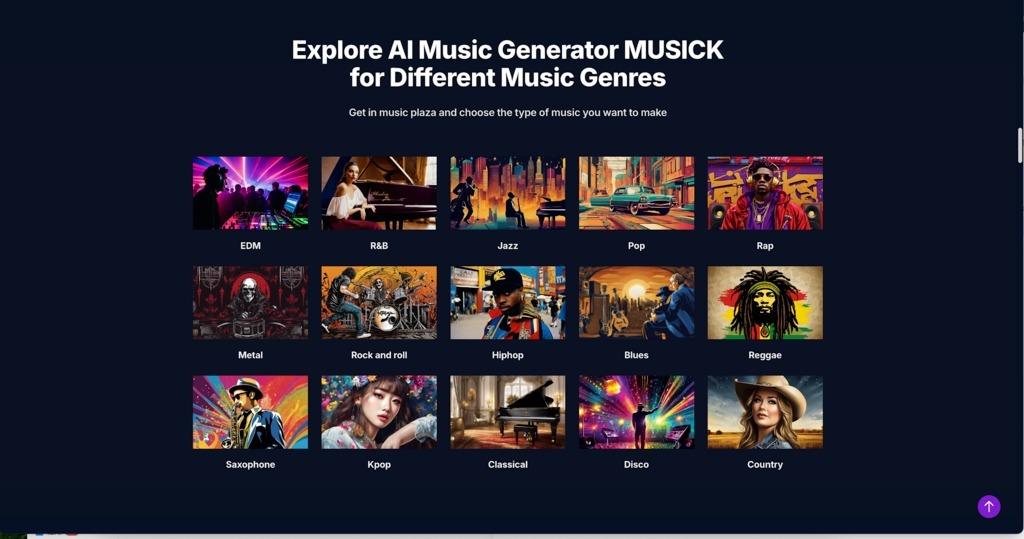
- Multiple Music Genres: Supports a wide range of musical styles, from cinematic scores to electronic textures, without requiring genre-specific hardware.
III. Why Selective Parameters Simplify Decisions
In professional environments, “good enough to decide” is often more valuable than “perfect but late.” Musick AI utilizes a restricted interface as a medium for clarity. By limiting the parameters to essential creative drivers—text and style markers—the tool forces a decision. This approach mirrors the reality of “The 15-Minute Deadline,” where speed of execution is the primary competitive advantage.
This functional minimalism treats the user as a director rather than a technician. By removing the infinite knobs of a traditional DAW, the tool ensures that the user stays focused on the “what” and “why” of a track, rather than getting lost in the “how.” These intentional constraints do not limit creativity; they focus it, ensuring that every second spent in the tool contributes directly to a tangible result.
IV. Four Steps to Realize Your Sonic Concept
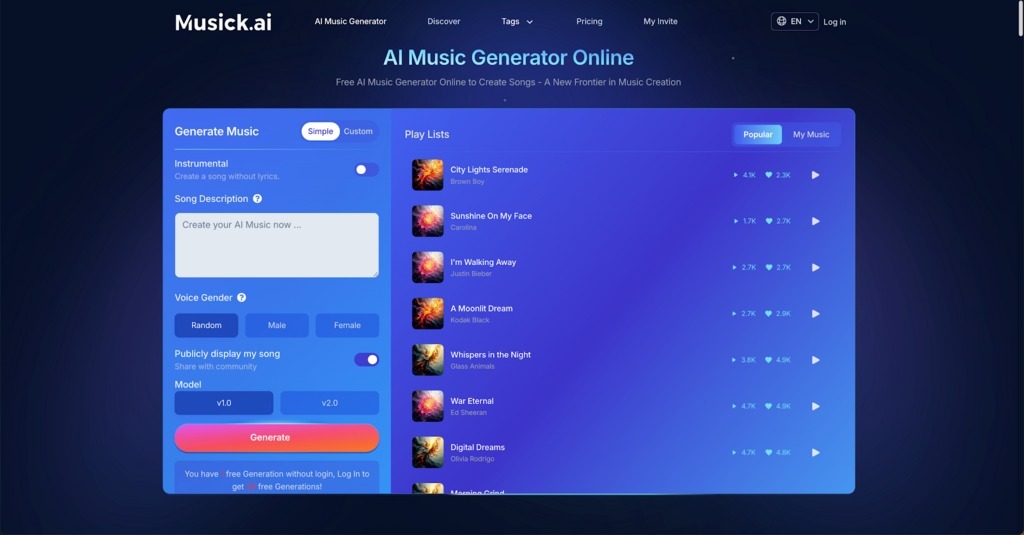
The journey from a blank screen to a preview file follows a linear, logical progression through the browser-based interface. After accessing the AI Song Maker, users follow four primary steps to realize their audio concept:
- Select Generation Mode and Instrumental Toggle: Choose between “Simple” or “Custom” modes at the top of the “Generate Music” panel and enable the “Instrumental” switch if the project requires a track without lyrics.
- Input Lyrics or Song Description: In “Simple” mode, enter a general theme in the “Song Description” box; in “Custom” mode, provide specific text in the “Lyrics” area to guide the vocal output.
- Define Style, Title, and Model: Use the “Style of Music” field to input descriptive tags like “violin” or “rawstyle,” assign a “Title,” and select a processing engine—such as “v1.0” or “v2.0″—to determine the final audio quality.
- Execute and Review: Click the “Generate” button to start the rendering process, then find and evaluate the output in the “Play Lists” section to determine if the track meets your project’s needs.
V. Who Is This Strategy For?
This methodology serves those who operate under the weight of “The 15-Minute Deadline.”
- Concept Artists: Those who need a “sonic atmosphere” to accompany their visual work use the tool to create immersive previews in seconds.
- Songwriters: For those facing “The Language Barrier,” the tool acts as a rapid sketchpad to test chord progressions and lyrical flow without needing to master an instrument.
- Marketing Leads: Professionals who must bypass the “Legal Shadow” use the tool to generate original, safe-to-use background music for global campaigns.
- Indie Game Developers: Small teams use the tool to test how different music styles affect the player’s emotional journey before committing to a final score.
VI. Why Musick AI Changes the Way You Create
| Dimension | Traditional Music Production | Musick AI Model |
| Time-to-Market | Days to weeks per iteration | Seconds to minutes |
| Technical Barriers | High (Requires DAW knowledge) | Low (Web-based/Natural language) |
| Creative Friction | High setup and technical overhead | Minimal; focus is on the prompt |
| Capital Investment | High (Software/Hardware/Talent) | Usage-based access |
Traditional production is often limited by hard work and technical skills. Because changing a track’s style takes so much time and effort, many creators stop exploring too early. Musick AI removes this barrier by making it easy to try new ideas instantly. In this new way of working, you don’t have to be a technical expert; you just need to be a good curator. Instead of spending days on one version, you can test multiple sounds in minutes to find exactly what works for your project.
VII. Why Your Creativity Still Matters
While Musick AI is incredibly fast and consistent, it’s important to understand where the human touch is still essential:
- Emotional Nuance: Technology can follow the rules of a genre, but it can’t yet replicate those tiny, “imperfect” human moments—like the way a real pianist lingers on a note or the raw emotion in a live performance—that give music its soul.
- Subjective Context: The system works with data, not personal experience. It doesn’t know your brand’s history or the specific vibe of your community. You still need to be the one to decide if a track truly “feels” right for your specific audience.
- The Final Call: At the end of the day, the tool is a Generator, not a Curator. It can give you ten great options, but it takes your ear and your judgment to pick the “Perfect Cut.”
- Creative Intent: The software provides the building blocks, but you provide the vision. It is a tool designed to amplify your taste, not to replace your unique creative voice.
VIII. Conclusion
The shift in music creation is moving away from a model of total manual control toward one of high-level curation. As the cost of generating a “first draft” drops toward zero, the value of the human ear—the ability to recognize what works—becomes the primary skill. Tools like Musick AI do not aim to finish the masterpiece; they aim to ensure that the masterpiece actually gets started. By removing the friction of the initial load, the creative process remains fluid, fast, and focused on the result.
Stop fighting with complex tools and start creating. Visit Musick AI today to experience the power of streamlined music generation and unlock your creative potential.